The Audit Logs feature in RCOM Gateway
The Audit Logs feature in RCOM Gateway provides a centralized and traceable record of user activity across the platform. It captures critical system actions performed by users, such as creating, updating, deleting, and authenticating within the system.
Audit logging improves security, accountability, and operational transparency by maintaining a historical record of configuration changes and user interactions. This enables administrators and system operators to monitor system activity, investigate incidents, and maintain compliance with internal governance policies.
Overview
Audit Logs track significant actions executed inside the RCOM Gateway interface. Every relevant operation performed by a user is recorded with contextual information such as:
- The action performed (Create, Update, Delete, Login, etc.)
- The affected module
- The user who initiated the action
- A timestamp of when the action occurred
- A detailed record of configuration changes (if applicable)
These logs help organizations understand who performed an action, what changed, and when it happened.
Audit logs are especially valuable in environments where multiple administrators manage workflows, integrations, devices, and system configurations.
Accessing Audit Logs
To view audit logs in RCOM Gateway:
- Open the RCOM Gateway web interface.
- Navigate to:
Settings → Audit Logs
The Audit Logs interface provides a structured table that lists recorded actions along with contextual details.
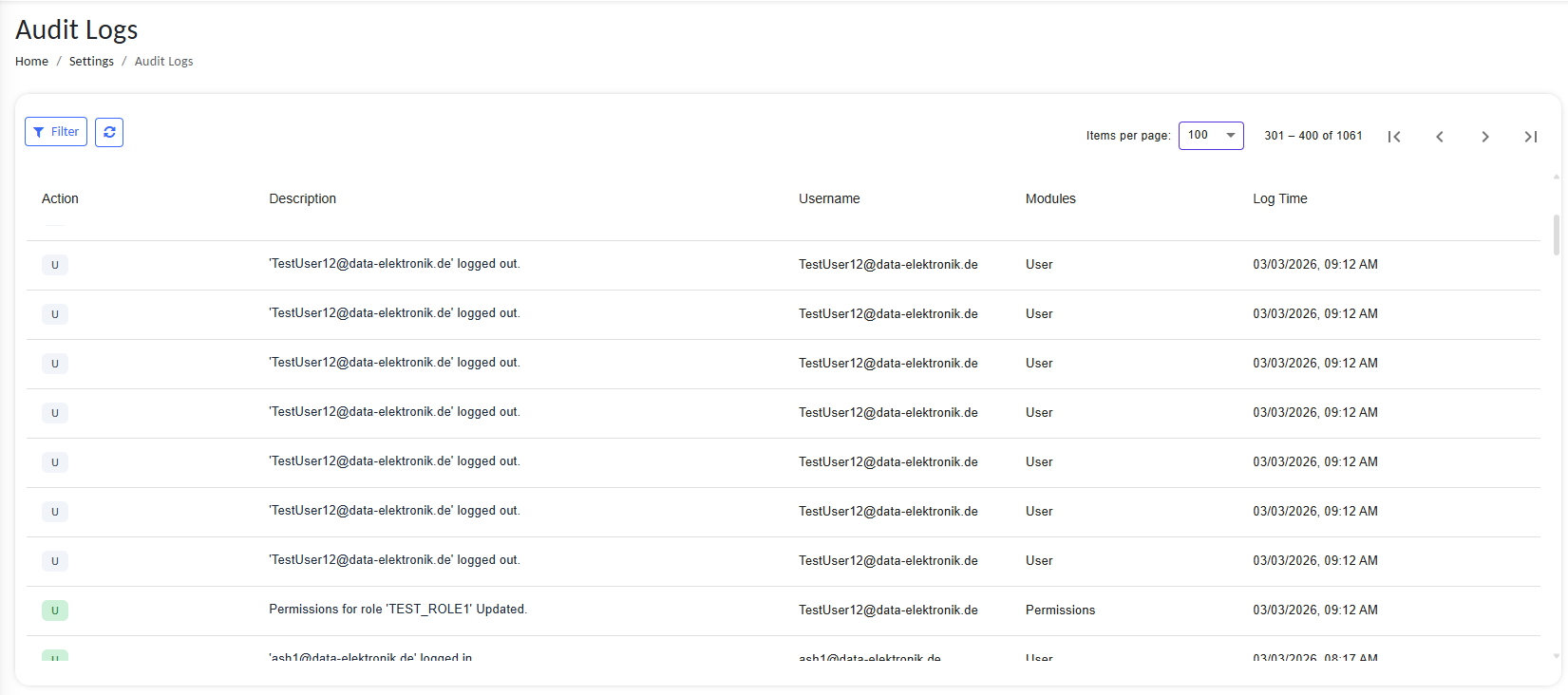
Audit Logs interface showing structured table of actions
Main Components
| Column | Description |
|---|---|
| Action | The type of action performed (Create, Update, Delete, etc.) |
| Description | A human-readable description of the action with a detailed view of changes |
| Username | The user who performed the action |
| Modules | The module or component affected |
| Log Time | Timestamp indicating when the action occurred |
Each log entry represents a specific system interaction.
Example entries include:
- User login events
- Configuration updates
- Object modifications
- Workflow changes
- Agent configuration updates
- Process template creation
Supported Action Types
| Action Code | Meaning |
|---|---|
| C | Create |
| U | Update |
| D | Delete |
These action markers allow administrators to quickly identify the type of operation performed.
Example:
'C' – 'opctest1' Created'U' – 'OpcClient' Updated
Filtering and Navigation
The Audit Logs interface supports filtering and pagination to efficiently browse large log datasets.
Filter Logs
Use the Filter button to refine the displayed logs based on criteria such as:
- Username
- Action type
- Module
- Time range
This allows administrators to quickly locate specific activities.
Refresh Logs
The Refresh button reloads the log list to display the most recent activities recorded by the system.
Viewing Detailed Changes
Certain operations (particularly updates) include additional change tracking information.
When a log entry contains modification details, a View Details button appears.
Selecting this option reveals a structured comparison of the configuration before and after the change.

Audit Logs showing View Details option
Change Comparison Viewer
For configuration updates, the Audit Logs system records the complete configuration state before and after modification.
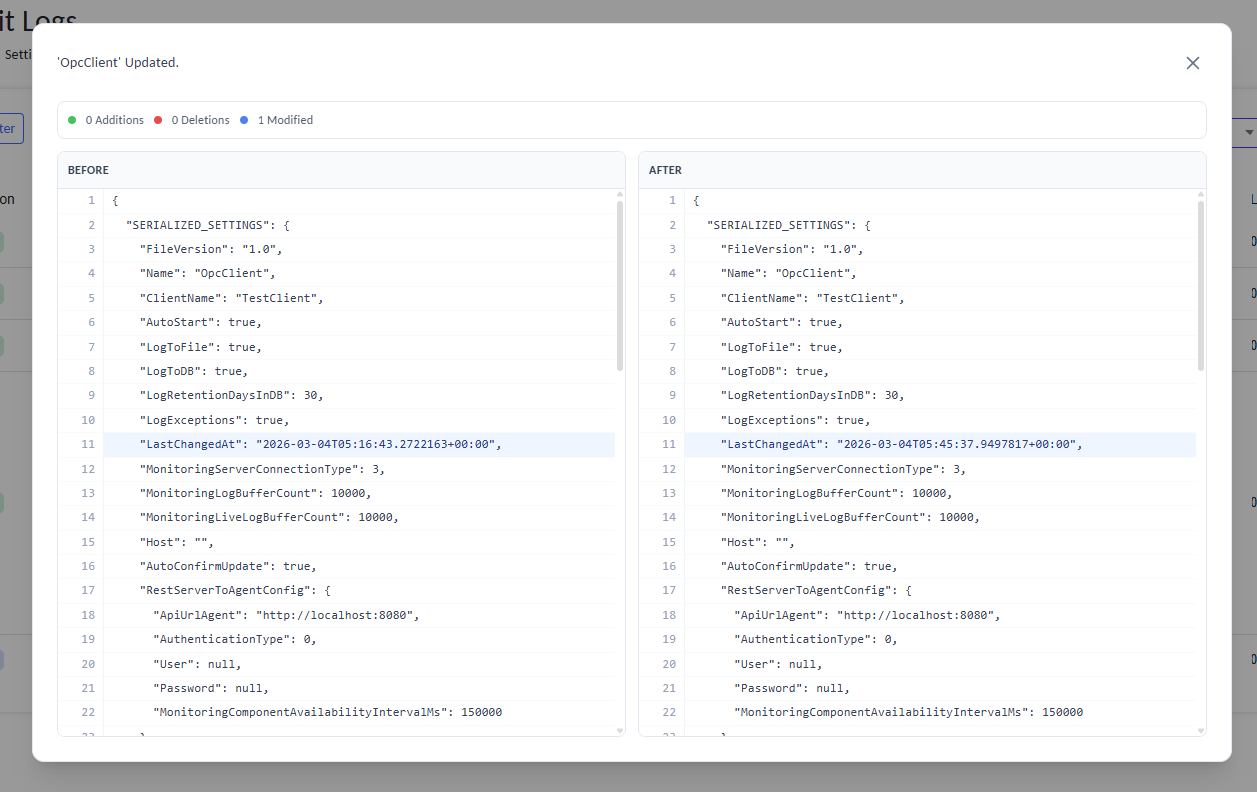
Side-by-side JSON diff comparison of configuration changes
The comparison viewer provides a side-by-side JSON diff displaying:
- Additions
- Deletions
- Modified values
Visual Indicators
| Indicator | Meaning |
|---|---|
| Green | Newly added values |
| Red | Removed values |
| Blue | Modified values |
This allows administrators to clearly identify exactly what changed.
Benefits of Audit Logging
Implementing audit logging provides several operational advantages.
- Security Monitoring: Administrators can track user activities and detect suspicious behavior.
- Accountability: All system changes are linked to specific user accounts.
- Troubleshooting: Audit logs help identify when a configuration change caused an issue.
- Compliance: Maintaining activity logs is often required for regulatory compliance and internal audits.
- Operational Transparency: Teams gain full visibility into system operations and administrative actions.