RCOM Agents - Edgeware for Auto ID Devices
In distributed IoT and Auto-ID environments, devices such as RFID readers, RTLS nodes, barcode scanners, and industrial sensors constantly generate valuable event data. However, this data is often trapped at the edge - never reaching enterprise systems in time to drive automation or analytics.
RCOM Agents bridge this gap.
An RCOM Agent is a lightweight software component(Edgeware) that runs close to your physical devices, captures their output, applies local intelligence, and transmits structured events securely to the RCOM Gateway via REST API or MQTT.
What Are RCOM Agents?
RCOM Agents act as local data gateways for your Auto-ID and sensor infrastructure. Installed on an on-premise PC, edge controller, or embedded device, the agent:
- Connects directly to nearby Auto-ID or IoT hardware
- Listens for tag reads, scans, or sensor updates
- Processes, filters, and buffers data locally
- Sends events to the RCOM Gateway or selected custom middleware for advanced operations and decision logic.
Agents support both MQTT and REST API communication modes, making them suitable for any network topology or IT policy.
Why Use RCOM Agents?
Modern supply chains and production environments rely on unified, real-time visibility. Without a consistent edge-to-cloud layer, operations face:
- Fragmented device management across multiple vendors
- Data noise and unfiltered reads polluting ERP/WMS transactions
- Downtime from unnoticed device failures
- High integration effort for every new site or project
RCOM Agents address these challenges by introducing a managed, intelligent edge tier that complements the RCOM Gateway core.
Key Capabilities
-
Device integration & management
Supports heterogeneous Auto-ID devices (RFID, RTLS, barcode, sensor) from different vendors, centrally managed through a single AppCenter interface. -
Device & Fleet Management
Centrally configure, monitor, and update thousands of devices across sites, regardless of vendor. -
Edge Intelligence
Agents run close to the devices, handling real-time filtering, de-duplication, validation, and local buffering during outages. -
No-Code Process Design
Build and deploy Auto-ID process flows with a template-driven designer, reducing custom coding. -
Monitoring & Alerts
Continuous device health checks, a central monitoring API, and notifications when issues occur. -
Flexible Integrations
Support for EPCIS, MQTT, REST/JSON.
Architecture at a Glance
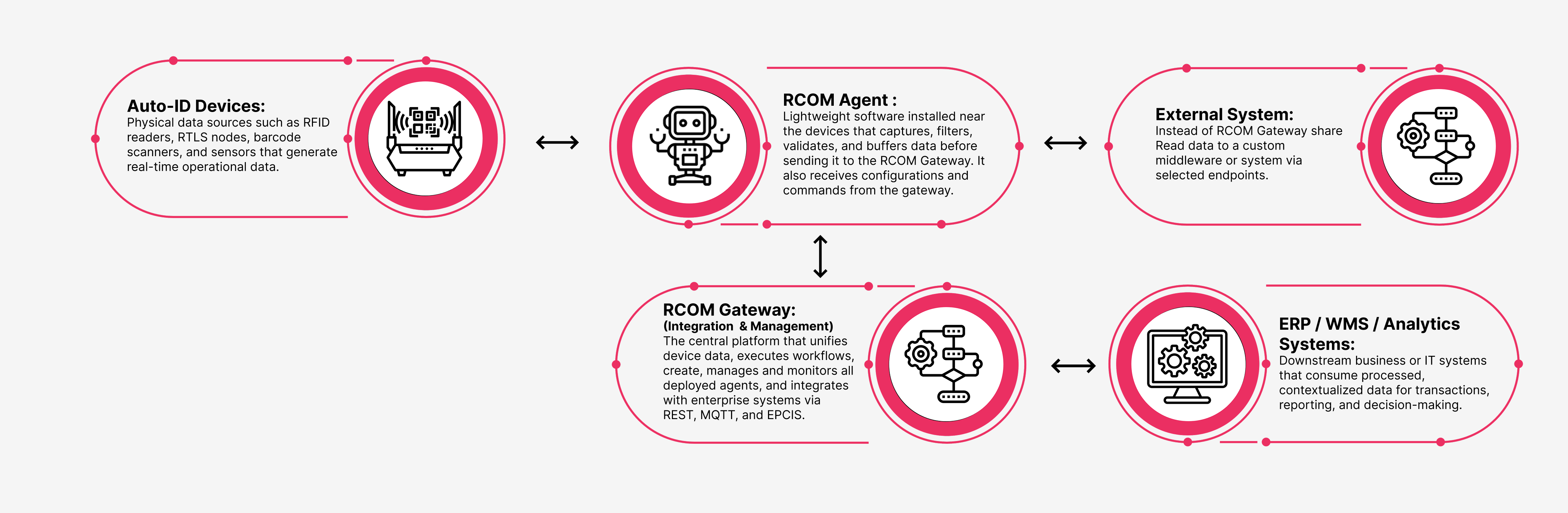
Agent architecture diagram
Each RCOM Agent acts as a local collector and edge processor, ensuring your operational data is normalized and transmitted efficiently to the enterprise layer.
Benefits
- Operational Continuity – Local buffering prevents data loss during connectivity drops.
- Scalable Rollout – Add new devices or locations without custom middleware.
- Centralized Visibility – View all agent and device status from a single dashboard.
- Vendor-Neutral Integration – Works with a wide range of industrial hardware.
- Smarter Edge Automation – Enable logic execution closer to the source for faster response times.
Set up an Agent at Device Edge
To set up an Agent service in your environment:
- Register a new agent in Gateway and configure connection and operation details.
- Install Agent Edgeware on your local system.
- Copy the registered agent configuration from Gateway to Edgeware.
- Run the agent and receive the Device Read data at the selected endpoint.