Optimize Gateway Workflows: Reduce Storage Growth and Improve Performance
Workflows that are easy to diagnose during development can create unnecessary data in production. Detailed execution logs accumulate across many jobs, and large query results can remain in workflow context after they have served their purpose. If final context is stored for every completed job, that data also grows in the Gateway database.
Gateway provides workflow-level controls for managing these demands. You can select an appropriate execution log level, decide whether to store final context with each job, remove intermediate variables with FlushContext, and retrieve data in manageable portions. These controls support more predictable use of workflow data while preserving the diagnostics that operations teams need.
This article uses an order-export workflow as an example. The workflow retrieves orders that are ready for dispatch, prepares a request for a warehouse system, submits it, and records the result. During development, it may be useful to retain detailed records, request payloads, and responses. In production, the useful information is often smaller: a batch identifier, the number of orders processed, and enough error detail to investigate a failure.
Start with useful execution logs
Execution logs help developers and administrators understand what happened during a workflow job. They are most useful when they record a meaningful event, identify the affected work, and give enough information to investigate an unexpected result.
In the workflow header, open Execution settings.
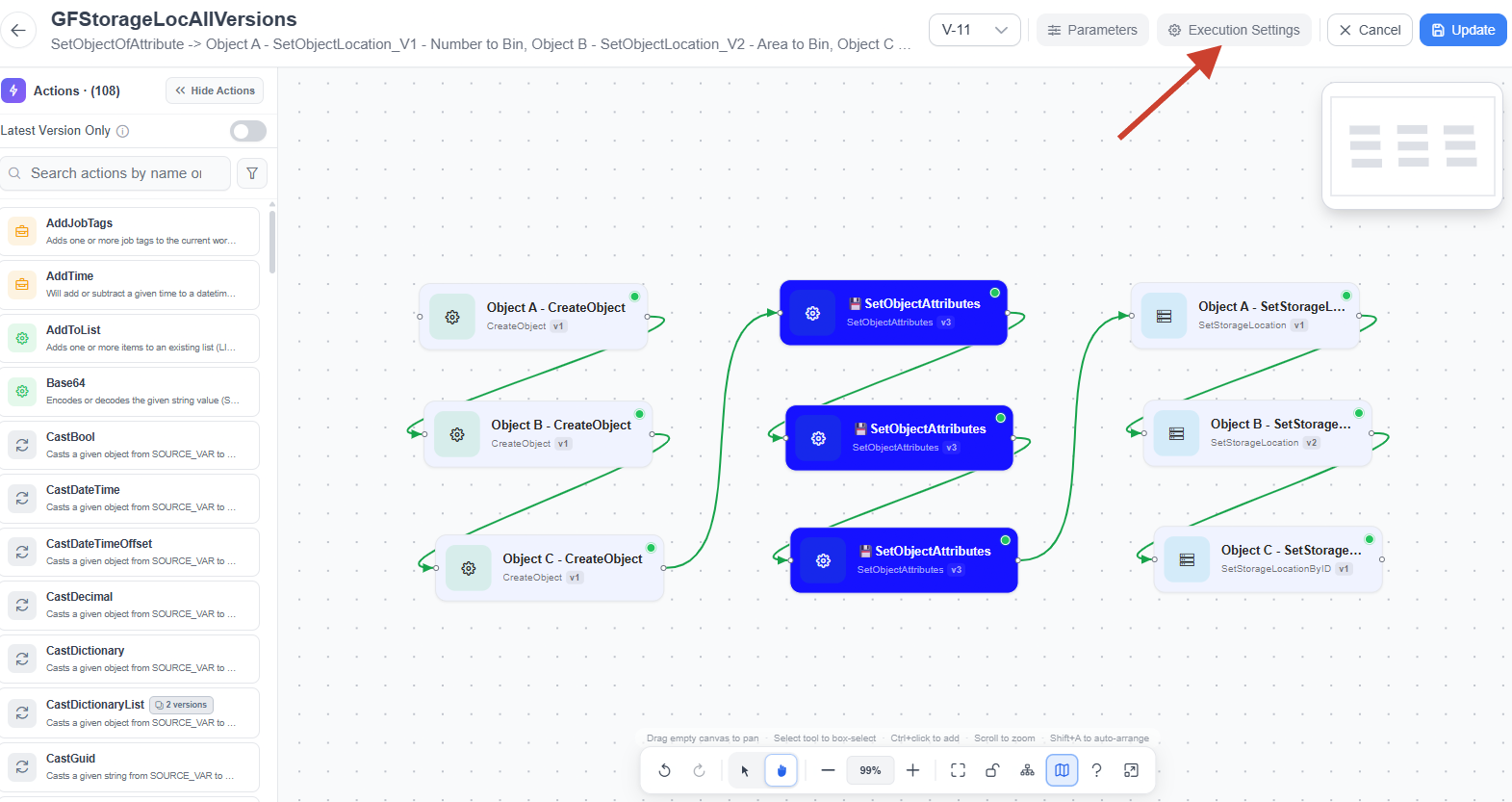
Configure Log Level in the Runtime Configuration section. This setting defines the minimum severity level of execution logs retained for the workflow. It applies to both logs written by Log actions and logs generated by Gateway while the workflow runs, such as workflow start and completion events.
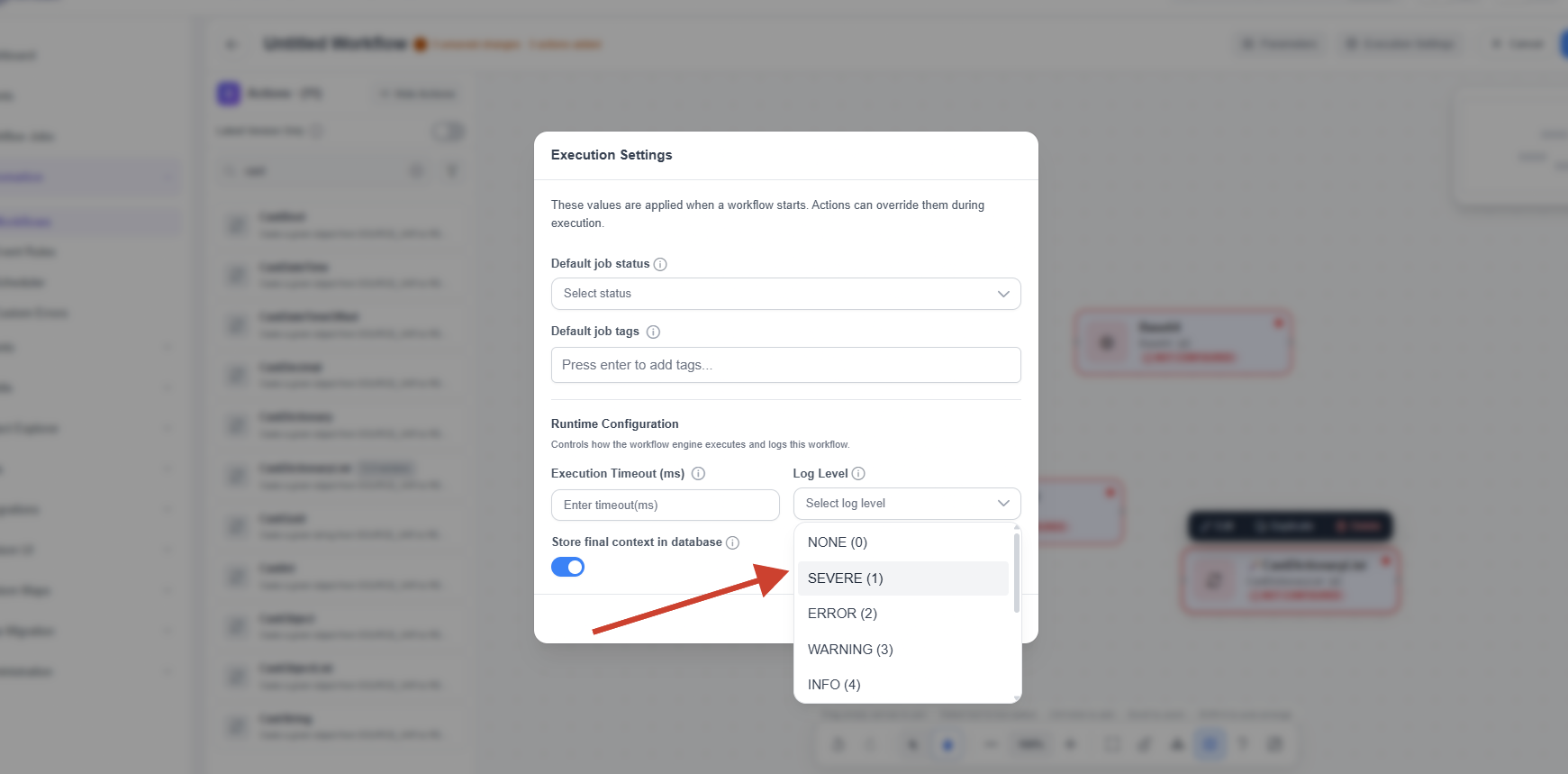
For example, an INFO setting retains INFO, WARNING, ERROR, and SEVERE entries while excluding more detailed CONFIG, FINE, FINER, and FINEST entries. The selected threshold therefore controls diagnostic detail from both custom workflow messages and Gateway-generated execution logs.
The Log action assigns a level to an individual message. Use INFO for meaningful operational checkpoints, WARNING for unexpected conditions that do not stop processing, and ERROR for failures that affect the workflow result. FINE, FINER, and FINEST are useful for increasingly detailed investigation. Set the LEVEL parameter explicitly for messages that matter in production. If a level is omitted or invalid, the action defaults to FINE.
For the order-export workflow, a useful completion message could be:
Order export completed. Batch: EXP-1042. Submitted: 250. Accepted: 248. Rejected: 2.
If a request fails, the log should identify the batch, the operation that failed, and the relevant status or concise error reason. It usually does not need to include every order in the batch or the full request and response payloads.
Avoid placing routine log actions inside loops unless each message serves a clear operational purpose. A workflow that processes 250 orders can often log a summary at the end of the batch instead of 250 similar success messages. When individual failures need attention, log the order identifier and the reason for failure.
Use a more detailed log level temporarily when investigating a problem, then restore the intended production level. Reducing retained execution logs helps control log storage. Reducing unnecessary Log actions and large message expressions can also reduce logging work, but the runtime effect should be measured under representative workload conditions.
Decide whether final context needs to be saved
Every workflow job has a context: its working set of input parameters, intermediate action outputs, retrieved data, and variables passed between actions. Context is needed while the workflow runs. The separate Store final context in database setting determines whether Gateway saves the completed workflow context with the job.
In the workflow header, open Execution settings.
Disable Store final context in database for production workflows where a saved context snapshot is not needed. This is often appropriate for reliable, high-volume workflows with clear operational logs and an external system of record.
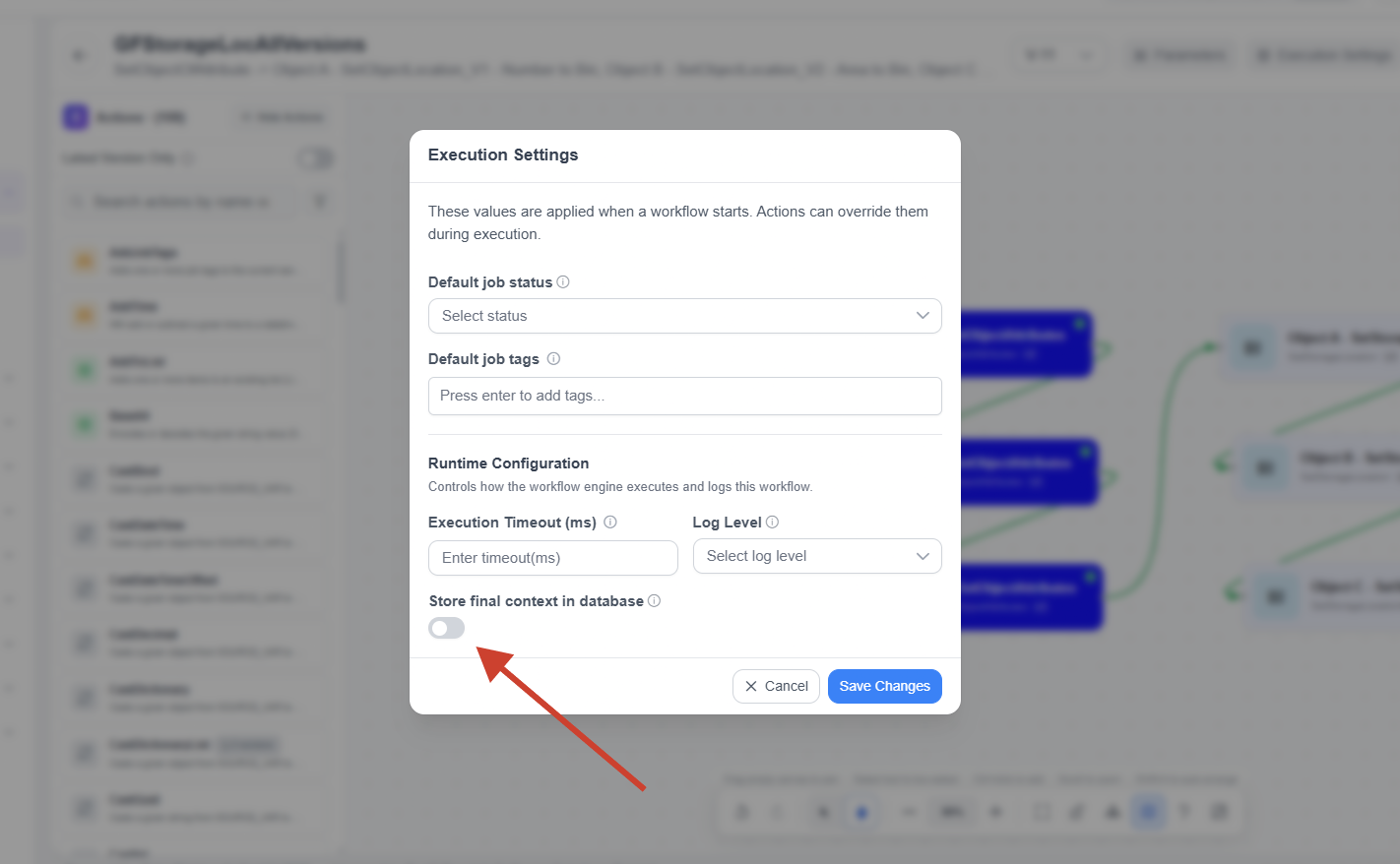
Click Save Changes to apply the setting.
In the order-export example, the final context may include the retrieved orders, a transformed warehouse request, and the warehouse response. Keeping this for every completed export can store multiple representations of the same business data. Disabling final-context storage avoids persisting that completed snapshot.
As an illustrative calculation, if a saved context averages 100 KB per job and the workflow runs 10,000 times a day, saved contexts represent approximately 1 GB of additional data per day before database overhead. Actual usage depends on the size and structure of the context; Gateway compresses context before saving it.
The main benefit of disabling final-context storage is lower database growth. It can also avoid the work of persisting the final snapshot, although the effect on end-to-end duration depends on the workflow. A workflow dominated by an external API call, for example, may show little measurable change.
The tradeoff is reduced visibility after a job completes. A saved final context can be valuable while diagnosing complex transformations or intermittent failures. Before disabling it, make sure the workflow logs and business outcome preserve the identifiers, counts, and failure details that support teams need. Do not replace stored context by writing complete payloads to logs.
Remove intermediate data with FlushContext
Large values are sometimes needed for only part of a workflow. Once a value has been used, keeping it in the live workflow context can add unnecessary working data.
The FlushContext action manages context variables during execution. It uses two parameters:
FLUSH_MODEselects the approach:BlackListremoves the specified variables and keeps the rest, whileWhiteListkeeps the specified variables and removes the rest.CONTEXT_VARIABLESaccepts*or a comma-separated list of context variable names.
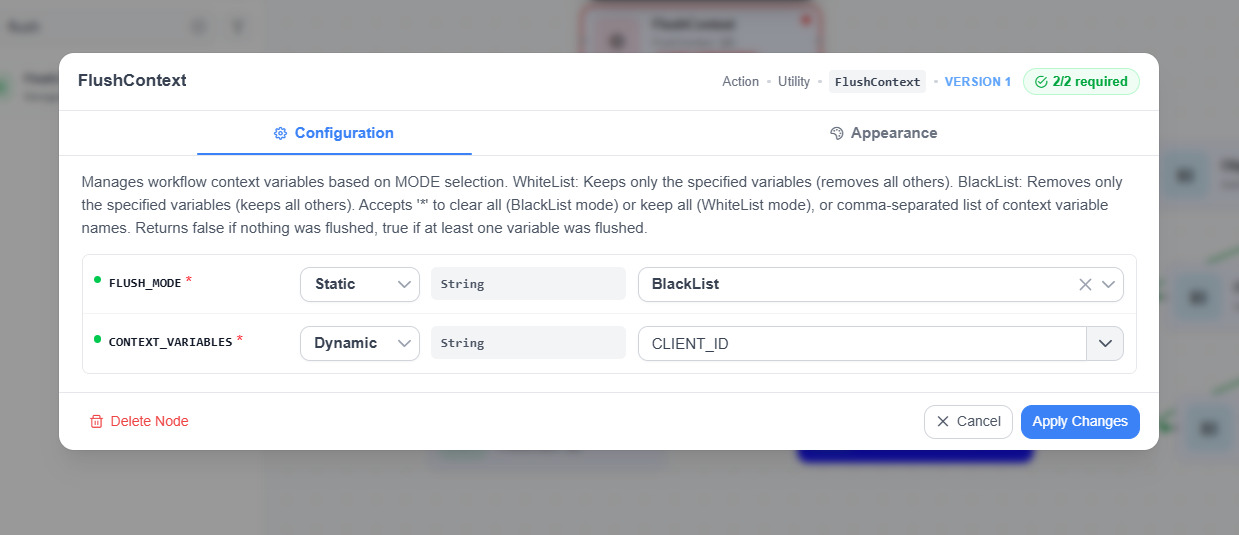
FlushContext configuration showing the FLUSH_MODE and CONTEXT_VARIABLES parameters.
Assume the order-export workflow stores its working values in ordersPage, requestPayload, and warehouseResponse. After it has processed the response and updated the order status, it can remove those variables with a FlushContext action configured as follows:
| Parameter | Value |
|---|---|
FLUSH_MODE | BlackList |
CONTEXT_VARIABLES | ordersPage,requestPayload,warehouseResponse |
This retains other context variables, such as batchId, pageOffset, submittedCount, and rejectedCount.
Place FlushContext only after the last action that needs each variable. If a later action updates exported orders from ordersPage, flushing it earlier will break the workflow. Retry and failure paths also need consideration: a retry may require requestPayload, while an error-handling action may require details from warehouseResponse.
WhiteList is useful near the end of a workflow when only a small diagnostic summary should remain. For example, the workflow could retain batchId, submittedCount, acceptedCount, and rejectedCount, removing all other current values. Because this removes anything not explicitly named, review downstream paths carefully before using it.
Flushing context removes data from the live workflow context. It can help limit the amount of intermediate data retained by long-running or repeated processing. It does not guarantee an immediate reduction in process memory or a faster job; memory reclamation and other references to the data also matter. The action returns false when nothing was flushed, so account for that result on paths where the named variables may not exist.
Use both controls for different purposes
FlushContext and Store final context in database work at different points in the workflow lifecycle.
| Control | Question it answers | Primary effect |
|---|---|---|
FlushContext | Which variables should remain available as the workflow continues? | Removes selected data from the live workflow context. |
| Store final context in database | Should Gateway save the completed context with the job? | Controls whether the final context snapshot is persisted. |
Use FlushContext when intermediate data is no longer required during execution. Disable Store final context in database when completed jobs do not need a saved context snapshot.
Both settings can be useful in the same workflow. The order-export workflow can flush the page-specific records, request, and response after every completed page while retaining counters needed for the next page. It can then complete without storing the final context. This reduces unnecessary data during execution and avoids database growth from a final saved snapshot.
Alternatively, keep final-context storage enabled and flush large intermediate variables before the workflow completes. The saved context can then contain a compact diagnostic summary rather than the full working data. Variables created after a flush remain in context unless another action removes them.
Retrieve only the data the workflow needs
Context controls work best when the workflow retrieves an appropriate amount of data in the first place. Removing a large result after it has been retrieved does not remove the cost of fetching, transferring, and processing it.
Use pagination when a workflow needs to process a growing dataset. Gateway's pagination approach uses a Limit to define how many records to return and an Offset to define where the page begins. A workflow can accept these as parameters and use them in a paginated query, such as a CustomPostgresSQL query.
For step-by-step instructions, see Pagination in Gateway.
For the order-export workflow, a page size of 250 orders is an illustrative starting point. The workflow retrieves one page, prepares and submits the warehouse request, records the result, removes page-specific context, and continues with the next page. It retains only the state needed to continue, such as the batch identifier, page position, and running totals.
Choose page size through testing. Smaller pages limit the amount of data handled at once but require more database queries and external requests. Larger pages reduce request frequency but increase the size of each working payload. Pagination helps bound per-page data; it does not reduce the total work required to process every record.
Use stable ordering with a unique tie-breaker. Also consider whether processing changes the result set. If exporting an order removes it from the set of orders ready for dispatch, increasing an offset can skip orders as the result set changes. A fixed batch or a suitable continuation key can be safer when records change during processing.
Select only the fields required by the next step. If the warehouse system needs an order identifier, destination code, SKU, and quantity, avoid retrieving unrelated notes or other large fields. For GetObjectsOfObjectGroup, provide COLUMN_NAMES to retrieve only the selected columns. This action retrieves all objects in the Object Schema, so column selection reduces fields but does not paginate the result. For paginated SQL queries, explicitly select only the required columns.
Avoid accumulating every retrieved page into one large context list. Process each page and retain only the data later actions need. Field selection and pagination can reduce working data and the amount of context that might otherwise be saved. Actual performance still depends on database access patterns, page size, workflow logic, and downstream response times.
Production-ready workflow checklist
Before publishing a workflow to production, confirm that:
- Log Level matches the diagnostic detail the operational team needs for both custom and Gateway-generated execution logs.
- Important
Logactions use an explicitLEVELand record useful identifiers, outcomes, and failure details without unnecessary payloads. - Store final context in database is disabled when a completed-job context snapshot is unnecessary.
FlushContextremoves intermediate variables only after their last use, including retry and error paths.- Large retrievals use a suitable pagination strategy and select only the fields required.
- Testing uses realistic data volumes and confirms correctness, useful diagnostics, storage growth, and runtime behavior.