Translation Management in R-COM Gateway
The Translation page in R-COM Gateway provides centralized control over all user-facing text used across the platform. It enables localization by mapping internal translation keys to language-specific values, currently supporting English (EN) and German (DE).
Navigation: Settings > Client Settings > Translations
This page is not just a static dictionary, it directly influences how UI content is rendered based on the selected user language.
Overview
The Translation page lists all available UI strings in a structured, searchable format.
Each entry consists of:
- Translation Key – A unique identifier used internally in the system
- English (EN) – Default/base language
- German (DE) – Localized value (if available)
Keys are grouped by modules (e.g., COMMON, OBJECTGROUP) to maintain organization and avoid collisions.
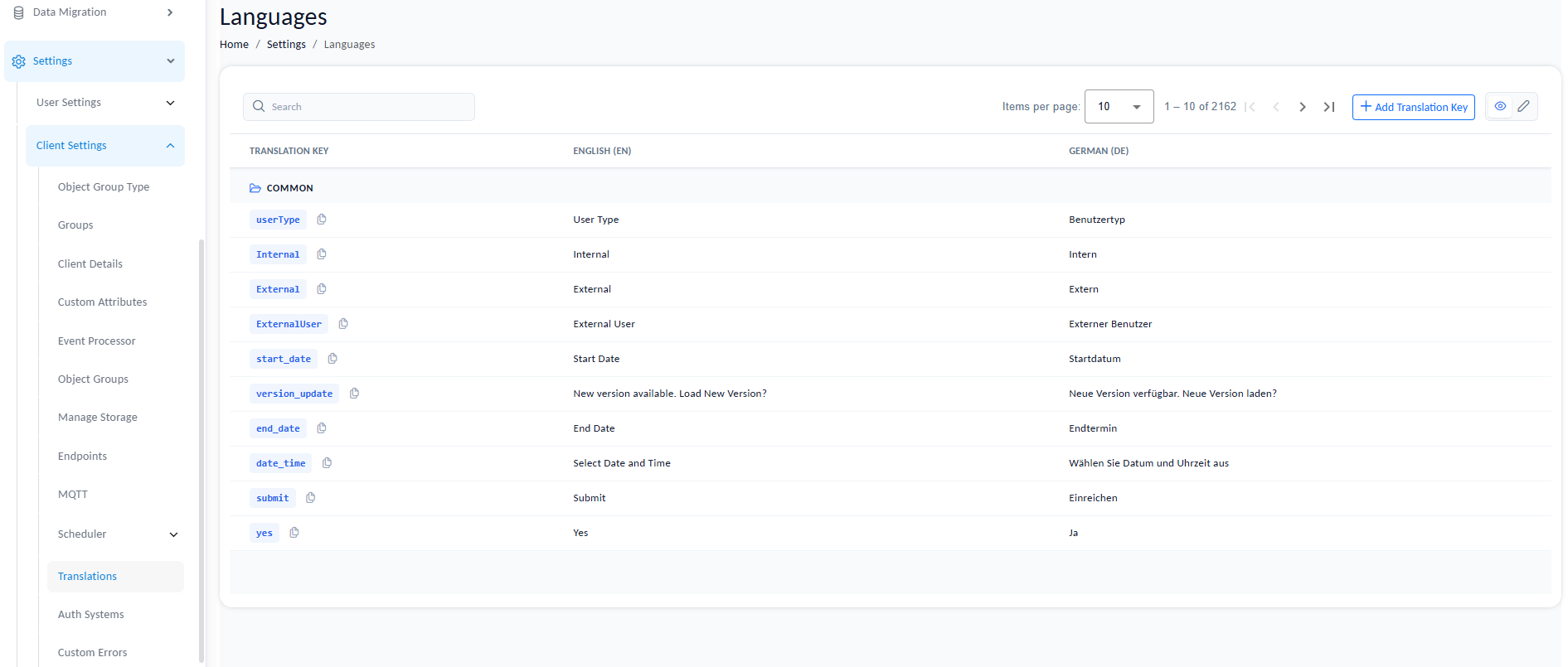
Translation Management interface showing keys and language values.
Key Capabilities
1. Centralized UI String Management
All UI text displayed in the Gateway is driven through translation keys. This ensures:
- Consistent terminology across modules
- Easy updates without touching code
- Support for multi-language deployments
2. Search and Filter
The search bar allows you to:
- Locate keys by name (e.g.,
dateFormat) - Find specific UI text by partial match
- Quickly jump to relevant modules or sections
This is critical because the system can contain thousands of keys.
3. Editing Translations
You can update the Englsih wordings or German translation for any existing key.
Behavior:
- English remains the base reference
- German overrides are applied when the system language is set to DE
- If no German value is provided, fallback behavior depends on implementation (typically English)
4. Creating Custom Translation Keys
You are not limited to predefined keys. The system allows creation of custom keys.
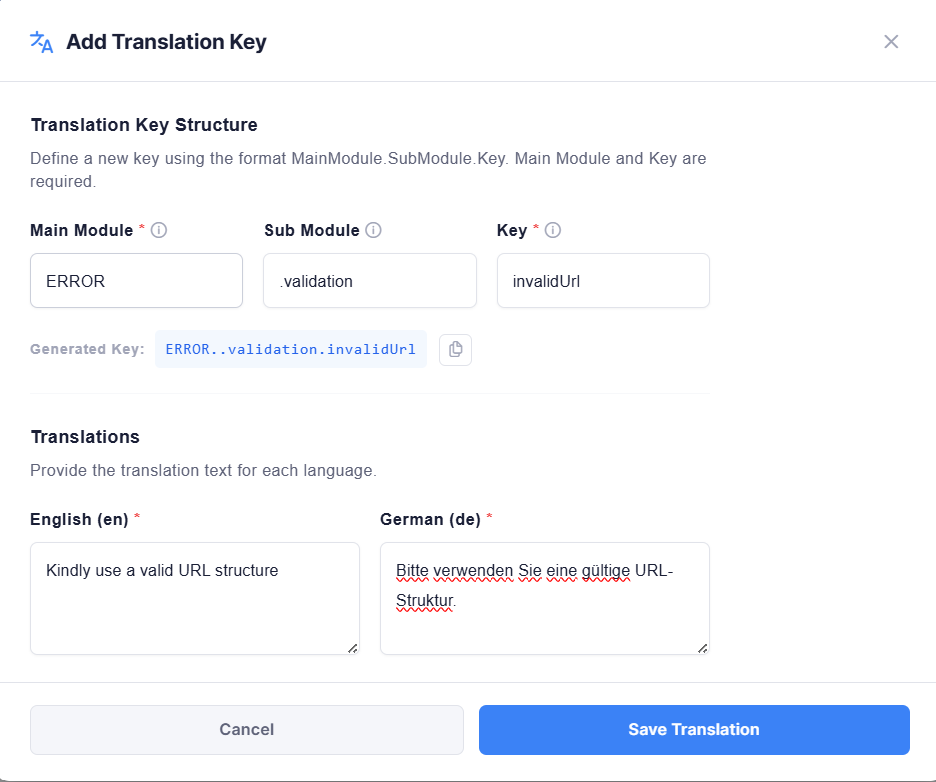
Creating a new custom translation key.
Key Structure
MainModule.SubModule.Key
| Component | Description |
|---|---|
| Main Module (Required) | Logical grouping (e.g., COMMON, ERROR, OBJECTGROUP) |
| Sub Module (Optional) | Additional categorization |
| Key (Required) | Actual identifier |
Example:
ERROR.validation.invalidUrl
5. Using Translation Keys in the System
Custom keys are usable within the Gateway wherever translation resolution is supported.
Current supported use case:
- Regex-based validation messages in Object Group creation
Example:
ERROR.invalid_url
Instead of hardcoding text, you reference the key. At runtime:
- If language = English → English value is shown
- If language = German → German value is shown
6. Language-Based Rendering
The system dynamically resolves text based on the selected language.
This applies to:
- Labels
- Messages
- Validation errors
- Configurable UI text
No redeployment or restart is required, changes reflect immediately.
Special Use Case: Date & Time Formatting
The Translation system is also used for locale-specific formatting, not just static text.
dateFormat Key
This key controls how date and time values are displayed across the UI.
Example values:
| Language | Format |
|---|---|
| English (EN) | MM/dd/yyyy, hh:mm a |
| German (DE) | dd.MM.yyyy, HH:mm |

Configuring date and time format for different languages.
Behavior:
When rendering a date:
- The system fetches the
dateFormatvalue for the active language - Applies formatting accordingly
This ensures:
- Regionally correct formats
- No hardcoded date structures in UI components
Best Practices
1. Use Structured Naming
Avoid flat or ambiguous keys.
| ❌ Bad | ✅ Good |
|---|---|
message1 | ERROR.objectgroup.invalidPattern |
text_one | COMMON.labels.required |
btn | OBJECTGROUP.actions.save |
2. Avoid Hardcoding Text
Always use translation keys for:
- Validation messages
- UI labels
- Dynamic content
3. Keep English as Source of Truth
Treat English as the canonical reference. Other languages should map cleanly to it.
4. Use Modules Properly
Group related keys under consistent modules:
| Module | Purpose |
|---|---|
COMMON | Shared UI text (buttons, labels, common terms) |
ERROR | Validation and system error messages |
OBJECTGROUP | Feature-specific text for Object Groups |
WORKFLOW | Workflow-related messages and labels |
ADMIN | Administrative interface text |
Limitations (Current State)
Translation key usage is not universally supported across all components yet.
Currently confirmed usage:
- ✅ Regex validation messages in Object Groups
Expansion to more UI areas is expected in future releases.