Scheduled Data Cleanup in R-COM Gateway
Scheduled Data Cleanup automatically removes aged operational data from selected Gateway tables. It keeps log, event, token, binary-object, and temporary-file data from growing without limit, helping the Gateway remain responsive and keeping database storage under control.
The configuration consists of one daily cleanup schedule and individual retention rules. In the current standard configuration, all 10 rules are active.
Accessing Data Cleanup
Navigate to:
Settings → Client Settings → Scheduler → Data Cleanup
The read-only page shows the current scheduler settings and all configured rules. Select Edit to change the configuration, then select Save to apply the changes. Use Refresh to reload the saved configuration.
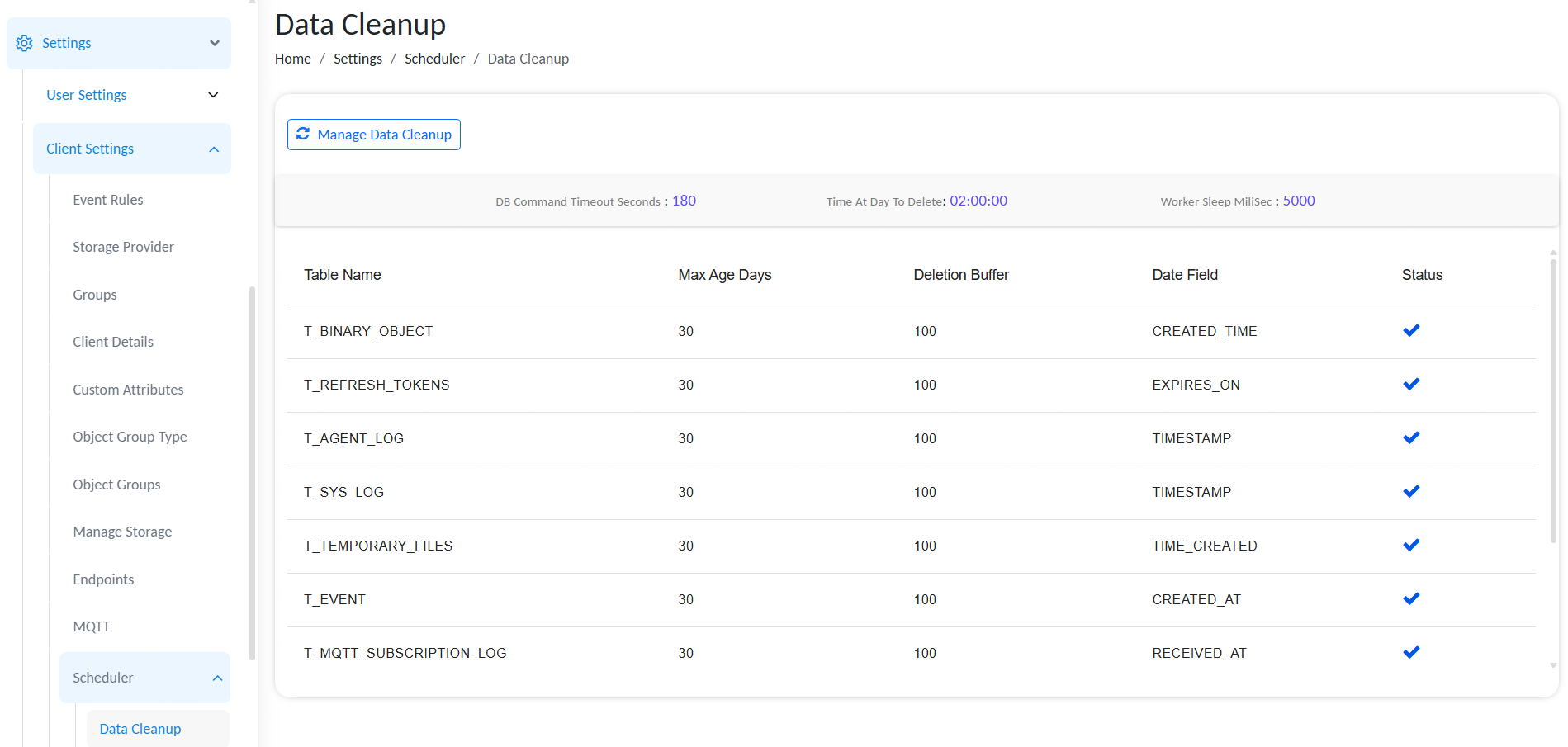
Data Cleanup
Data cleanup permanently deletes records. Review the retention period, date column, and rule status carefully before saving changes in a production environment.
How the Cleanup Process Works
At the configured daily time, Gateway evaluates each active rule. For a rule, it uses the selected date column to identify records older than the configured maximum age and deletes qualifying records in controlled batches.
For example, a rule with Max Age (Days) set to 30 and Date Column set to TIMESTAMP targets records whose TIMESTAMP is more than 30 days old when the scheduled cleanup runs.
Disabled rules remain configured but are skipped by the cleanup job.
Scheduler Settings
The Data Cleanup Details section controls the overall execution of the cleanup worker.
| Field | Example value | Description |
|---|---|---|
| DB Command Timeout (s) | 180 | Maximum time, in seconds, allowed for a database cleanup command before it times out. |
| Time At Day To Delete | 08:58 | Daily time at which Gateway starts the scheduled cleanup. The effective time zone follows the Gateway/server configuration. |
| Worker Sleep (ms) | 6,000 | Pause, in milliseconds, between cleanup worker iterations. This reduces sustained database load while the worker processes deletion batches. |
Scheduler Tuning
- Use a time with low database activity for the daily schedule.
- Increase DB Command Timeout only when valid cleanup commands regularly require more time; first investigate slow queries, locks, and database capacity.
- A shorter Worker Sleep can complete cleanup sooner but increases database activity. A longer value reduces load but extends the cleanup window.
- Coordinate changes with the database administrator when the Gateway database is shared with other production workloads.
Cleanup Rule Fields
Each row in Data Cleanup Rules defines retention for one table.
| Field | Description |
|---|---|
| Table Name | Gateway table to evaluate for cleanup. |
| Max Age (Days) | Retention period in whole days. Records older than this age, based on the selected date column, are eligible for deletion. |
| Deletion Buffer | Number of eligible records handled in one deletion batch. Smaller batches place less sustained load on the database; larger batches reduce the number of database operations but can increase locking and execution time. |
| Date Column | Timestamp or date field used to calculate a record's age. It must correspond to the lifecycle event intended for retention. |
| Status | Enables or disables the rule. Only active rules run during the daily cleanup. |
| Action | Lets an administrator duplicate or delete a rule while editing. |
Keep the selected date column aligned with the data lifecycle. For example, PROCESSED_AT retains jobs by their processing date, while LAST_USED_ON retains refresh tokens by their last-use date.
Current Scheduled Cleanup Rules and Exmaples
The following ten rules are enabled in the current configuration. The defaul value for Max age (days) is 30.
| Table name | Max age (days) | Deletion buffer | Date column |
|---|---|---|---|
T_AGENT_LOG | 30 | 100 | TIMESTAMP |
T_BINARY_OBJECT | 2 | 40 | CREATED_TIME |
T_EVENT | 2 | 100 | CREATED_AT |
T_JOB | 30 | 100 | PROCESSED_AT |
T_JOB_LOG | 3 | 100 | TIMESTAMP |
T_MQTT_CLIENT_CONNECTION_LOG | 30 | 100 | LAST_CONNECTED_AT |
T_MQTT_SUBSCRIPTION_LOG | 30 | 100 | RECEIVED_AT |
T_REFRESH_TOKENS | 2 | 100 | LAST_USED_ON |
T_SYS_LOG | 2 | 100 | TIMESTAMP |
T_TEMPORARY_FILES | 30 | 100 | TIME_CREATED |
Editing Rules
To update scheduled cleanup:
- Open Settings → Client Settings → Scheduler → Data Cleanup.
- Select Manage Data Cleanup.
- Update the scheduler settings if required.
- Add a rule with Add New, or change an existing row.
- For each rule, select the table, retention period, deletion buffer, and date column.
- Enable the rule only after verifying that the retention period meets operational and compliance requirements.
- Select Save.
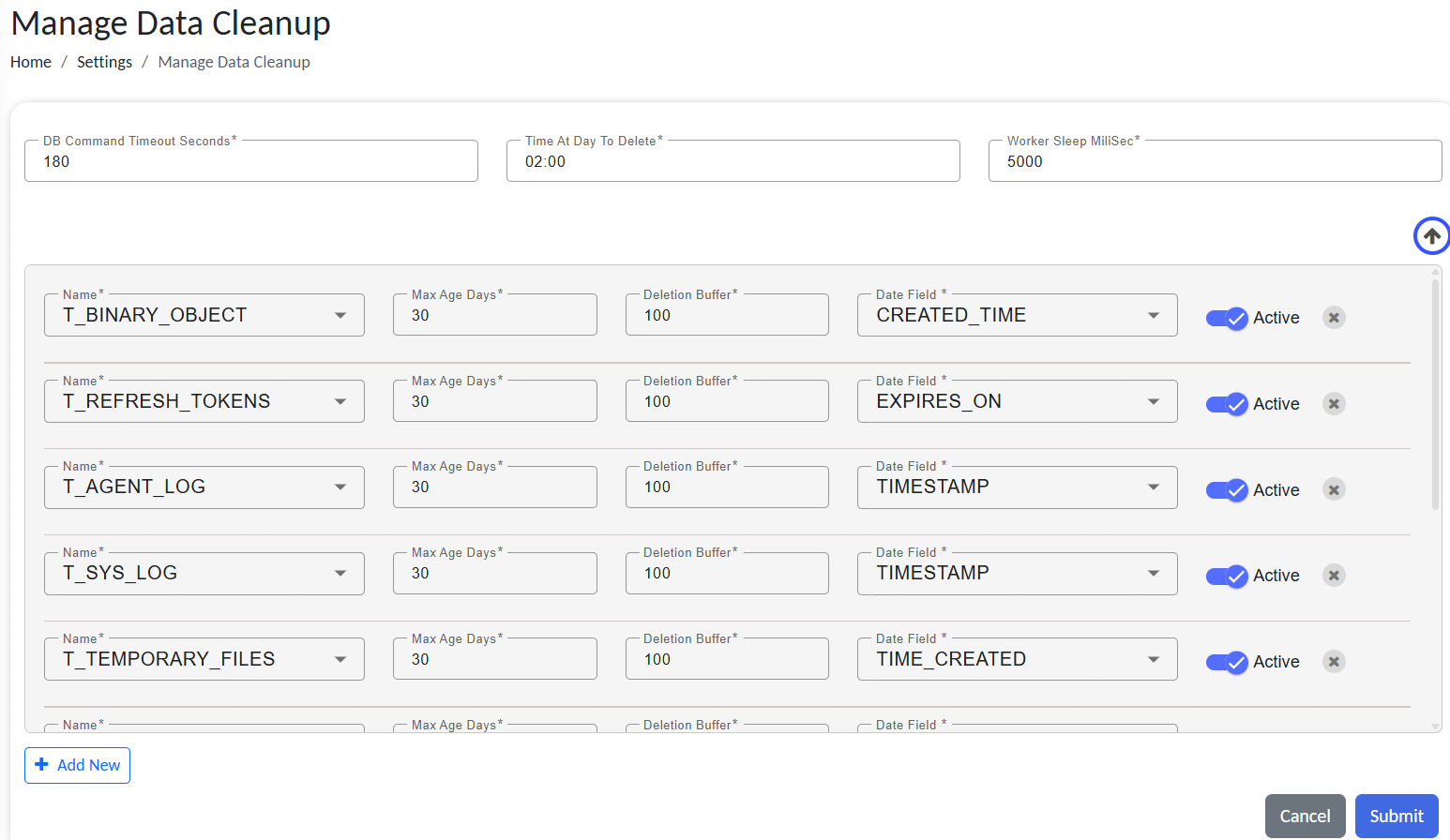
Manage Data Cleanup
When adding a new rule, ensure that the selected table and date column are compatible. Do not create multiple active rules for the same table unless this has been explicitly validated for the deployment.
Operational Guidance
Before Reducing Retention
Before lowering a maximum age or enabling a new rule:
- Confirm that the data is not required for troubleshooting, audit, reporting, integrations, or legal retention.
- Confirm that backups and restore procedures can recover data if a configuration error is discovered.
- Review the expected volume of eligible records, especially when enabling a rule for the first time.
- Schedule the change during a low-activity window and monitor the database after the next run.
Troubleshooting
| Symptom | Checks |
|---|---|
| Old records remain | Confirm that the rule is active, the correct date column is selected, the records are older than the retention threshold, and the daily schedule has passed. |
| Cleanup is slow or times out | Review database locks and performance, check the command timeout, and consider reducing the deletion buffer. |
| Database load is high during cleanup | Increase the worker sleep interval, reduce deletion buffers, and move the schedule to a quieter time. |
| Needed data was removed | Restore from an approved backup if available; cleanup cannot restore deleted records. |
Do not use the cleanup rules as a substitute for a backup and retention policy. Once data is deleted and no usable backup exists, it cannot be recovered through Gateway.