Object References in R-COM Gateway
Object References allow one Object to link to another Object in R-COM Gateway.
With this feature, an attribute in one Object Group can store a reference to an Object in the system. This makes it possible to model relationships between business entities, such as a delivery position linked to a delivery, an asset linked to a location, or a maintenance task linked to a machine.
Object References extend Object Groups beyond simple data storage. Instead of storing only values such as text, numbers, dates, or boolean fields, an Object can point to another Object and create a traceable relationship between records.
What Is an Object Reference?
An Object Reference is an attribute value that links one Object to another Object by using the referenced Object’s OBJECT_ID.
Each reference points to one Object.
Example:
{
  "OBJECT_ID": "9ceb38ef-a325-4711-9d79-5610caf715bf",
  "positionNumber": 10,
  "itemNumber": "ITEM-001",
  "delivery": "c7d6f1b2-08cd-4e7b-bd36-60c74021a4c5"
}
In this example, the delivery attribute stores the OBJECT_ID of a delivery Object. This links the delivery position to that delivery record.
Why Object References Are Used
Object References are used when records in different Object Groups are related to each other.
Common examples include:
| Use Case | Example |
|---|---|
| Delivery management | A delivery position references a delivery. |
| Asset tracking | An asset references a location. |
| Maintenance management | A maintenance task references a machine. |
| Healthcare | A medical device references a room or department. |
| Warehouse operations | A pallet references an order, shipment, or storage area. |
Without Object References, related Object IDs would need to be stored as plain text. That approach does not create a real relationship between Objects. With Object References, R-COM Gateway can display the linked Object, allow users to open it directly, validate dependencies during deletion, and identify Objects that reference a selected Object.
Reference Column Type
Object References are configured using the Reference Column Type in the Object Data Designer.
A Reference column stores the OBJECT_ID of another Object. The referenced Object can belong to any Object Group in the system.
This means the same Reference column can point to Objects from different Object Groups, depending on the value stored in each record.
Example:
An Object Group named activityLog contains a Reference column named targetObject.
One activity log record may reference an asset:
{
  "activity": "Moved",
  "targetObject": "6f24f4ef-7a0f-46c3-8eaa-85ed421e3d67"
}
Another activity log record may reference a delivery:
{
  "activity": "Approved",
  "targetObject": "c7d6f1b2-08cd-4e7b-bd36-60c74021a4c5"
}
Both records use the same Reference column, but each record can point to a different Object.
How Object References Work
Reference Values Are Stored as OBJECT_IDs
A Reference column stores the OBJECT_ID of the target Object.
The OBJECT_ID is the unique system identifier of the Object being referenced.
Example reference value:
c7d6f1b2-08cd-4e7b-bd36-60c74021a4c5
When this value is saved in a Reference column, R-COM Gateway uses it to identify and link the referenced Object.
Each Reference Links to One Object
A single Reference column value can point to one Object.
Supported:
{
  "assignedRoom": "6f24f4ef-7a0f-46c3-8eaa-85ed421e3d67"
}
Not supported in a single Reference column:
{
  "assignedRooms": [
    "6f24f4ef-7a0f-46c3-8eaa-85ed421e3d67",
    "9ceb38ef-a325-4711-9d79-5610caf715bf"
  ]
}
If one Object must reference multiple Objects, create separate Reference columns or model the relationship using another Object Group.
Each Record Can Reference a Different Object Group
The target Object Group is not fixed at column creation. The Reference column can point to any Object in the system.
Example:
| Object Group | Record | Reference Column | Referenced Object Group |
|---|---|---|---|
activityLog | Record 1 | targetObject | assets |
activityLog | Record 2 | targetObject | deliveries |
activityLog | Record 3 | targetObject | locations |
This is useful when a record may be related to different types of entities depending on the process.
Configuring a Reference Column
Reference columns are configured in the Object Data Designer.
To create a Reference column:
- Open the Object Group in the Object Data Designer.
- Add a new attribute.
- Enter the column name.
- Select the
ObjectReferencecolumn type. - Configure whether the column allows null values.
- Save the Object Group structure.
Example configuration:
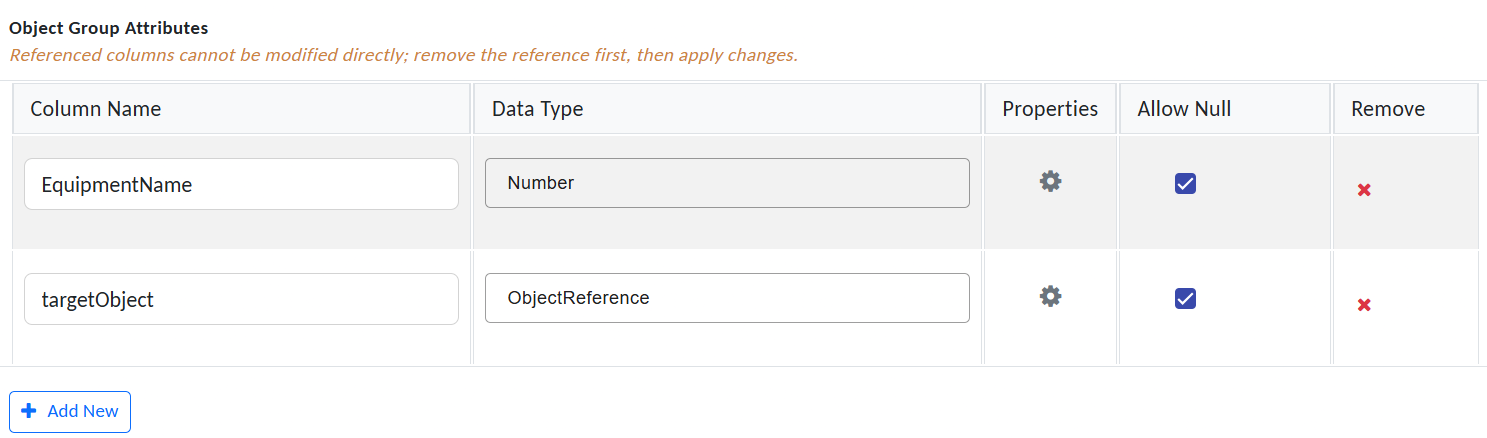
Add Object Referance
This configuration creates a Reference column that can store the OBJECT_ID of one Object.
Displaying Object References
In the Object data view, reference values are displayed as clickable links.

View Object Referance
Clicking the link opens the referenced Object.
If No Unique Constraints
Is Defined
If the referenced Object Group does not have a Unique Constraint, the link text displays the referenced Object’s OBJECT_ID.
Example:
c7d6f1b2-08cd-4e7b-bd36-60c74021a4c5
If a Unique Constraint Is Defined
If the referenced Object Group has one or more Unique Constraint fields, the link text displays the concatenated Unique Constraint values.
Example referenced Object:
{
  "OBJECT_ID": "c7d6f1b2-08cd-4e7b-bd36-60c74021a4c5",
  "deliveryNumber": "DEL-10001",
  "year": "2026"
}
If deliveryNumber and year are configured as Unique Constraint fields, the reference link text may appear as:
DEL-10001, 2026
This makes references easier to identify in the Object data view.
Viewing Objects That Reference the Current Object
Each Object includes an option to display all Objects that reference it.
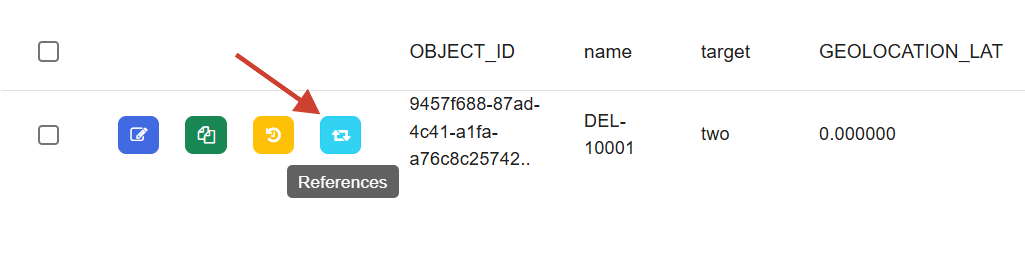
Add referanced objected
This helps users identify where an Object is used before modifying or deleting it.
Example:
A delivery Object may be referenced by multiple delivery position Objects.
When viewing the delivery Object, users can open the reference overview to see all Objects that point to it.
Example result:
| Referencing Object Group | Referencing Objects |
|---|---|
deliveryPosition | POS-001, POS-002, POS-003 |
activityLog | LOG-10001, LOG-10002 |
This makes it easier to trace dependencies between Object Groups.
Deleting Referenced Objects
R-COM Gateway checks Object References when an Object is deleted.
If an Object is referenced by another Object, deletion depends on whether the referencing column allows null values.
Deletion Fails When the Referencing Column Is Not Nullable
If another Object references the Object through a Reference column that does not allow null values, deletion fails.
This applies to:
- Deletion from the user interface.
- Deletion through the
DeleteObjectaction.
Example:
A deliveryPosition Object references a delivery Object through the delivery Reference column.
The delivery column is configured with Allow Null = No.
If a user tries to delete the referenced delivery Object, the deletion fails because the delivery position requires that reference.
Why This Protection Exists
This prevents broken required references.
Without this validation, a required Reference column could point to an Object that no longer exists. That would create inconsistent Object data and may affect workflows, reports, or object views.
Workflow Action Behavior
Object References can also be used through workflow actions.
GetObjectsOfAttributes
For Reference columns, the GetObjectsOfAttributes action returns basic reference information.
It returns:
OBJECT_IDUniqueGroupName
The action does not automatically resolve and return the full linked Object.
Example result:
{
    "targetObject": "c7d6f1b2-08cd-4e7b-bd36-60c74021a4c5",
    "targetObject_UniqueGroupName": "deliveries"
}
Use this result to identify the referenced Object. If the full Object data is required, retrieve the referenced Object separately.
SetObjectsOfAttributes
The SetObjectsOfAttributes action accepts the OBJECT_ID as the value for Reference columns.
Example:
{
  "targetObject": "c7d6f1b2-08cd-4e7b-bd36-60c74021a4c5"
}
The provided OBJECT_ID identifies the Object that should be linked through the Reference column.
Actions for Finding Referencing Objects
R-COM Gateway provides actions to find Objects that reference a selected Object.
These actions are useful for dependency checks, reporting, validation, cleanup workflows, and impact analysis.
GetReferencingObjects
This action accepts an OBJECT_ID and returns all Objects that reference it, grouped by Object Group.
Return type:
Dictionary<string, List<Guid>>
The dictionary key is the Object Group name.
The dictionary value is a list of OBJECT_IDs from that Object Group that reference the given Object.
Example return value:
res["T_GROUP1"] = [
  c7d6f1b2-08cd-4e7b-bd36-60c74021a4c5,
  9ceb38ef-a325-4711-9d79-5610caf715bf
];

res["T_GROUP2"] = [
  6f24f4ef-7a0f-46c3-8eaa-85ed421e3d67
];
This means:
- Two Objects from
T_GROUP1reference the selected Object. - One Object from
T_GROUP2references the selected Object.
Use this action when you need a system-wide overview of references to an Object.
GetReferencingObjectsByGroup
This action accepts:
- An
OBJECT_ID - An Object Group name
It returns a list of OBJECT_IDs from the specified Object Group that reference the given Object.
Example input:
{
  "OBJECT_ID": "c7d6f1b2-08cd-4e7b-bd36-60c74021a4c5",
  "objectGroupName": "deliveryPosition"
}
Example result:
[
  "9ceb38ef-a325-4711-9d79-5610caf715bf",
  "6f24f4ef-7a0f-46c3-8eaa-85ed421e3d67"
]
Use this action when you need to find references from one specific Object Group.
Practical Example: Delivery and Delivery Positions
A common use case is linking delivery positions to a delivery.
Object Group: deliveries
Example Object:
{
  "OBJECT_ID": "c7d6f1b2-08cd-4e7b-bd36-60c74021a4c5",
  "deliveryNumber": "DEL-10001",
  "status": "Open"
}
Object Group: deliveryPosition
Example Object:
{
  "OBJECT_ID": "9ceb38ef-a325-4711-9d79-5610caf715bf",
  "positionNumber": 10,
  "material": "MAT-001",
  "quantity": 25,
  "delivery": "c7d6f1b2-08cd-4e7b-bd36-60c74021a4c5"
}
In this setup:
deliveryPositioncontains a Reference column nameddelivery.- The
deliverycolumn references one delivery Object by storing itsOBJECT_ID. - Users can click the reference link in the Object data view to open the related delivery.
- The referenced delivery cannot be deleted if the
deliveryReference column is not nullable and delivery position records still reference it.
Best Practices
Use Object References When Records Are Related
Use Object References when one Object needs to point to another Object.
Examples:
| Source Object Group | Reference Column | Example Target |
|---|---|---|
deliveryPosition | delivery | A delivery Object |
assetMaintenance | asset | An asset Object |
patientDeviceAssignment | device | A medical device Object |
activityLog | targetObject | Any related Object |
This keeps relationships traceable and avoids storing linked Object IDs as plain text.
Use Clear Column Names
Because a Reference column can point to Objects from any Object Group, the column name should make the expected relationship clear.
Good examples:
targetObject
relatedObject
linkedAsset
delivery
assignedRoom
Avoid vague names:
ref
object1
value
data
Make Required References Non-Nullable
If a reference is mandatory for the business process, disable Allow Null.
Example:
A delivery position should always belong to a delivery.
Recommended configuration:
| Column | Type | Allow Null |
|---|---|---|
delivery | Object Reference | No |
This ensures that users cannot create delivery positions without assigning them to a delivery.
Check References Before Deleting Objects
Before deleting an Object, check whether other Objects reference it.
Use the reference overview in the Object view or the available reference lookup actions.
This helps avoid failed deletion attempts and prevents accidental disruption of related data.
Store Relationships as References, Not Plain Text
Do not store related Object IDs in normal string columns when the value represents a link to another Object.
Poor approach:
{
  "deliveryId": "c7d6f1b2-08cd-4e7b-bd36-60c74021a4c5"
}
Better approach:
{
  "delivery": "c7d6f1b2-08cd-4e7b-bd36-60c74021a4c5"
}
The second approach uses a Reference column, allowing R-COM Gateway to treat the value as a real Object link.